Embed 中的工作流管理#
功能可用性说明
Embed 功能需要嵌入许可证。有关使用场景、成本及授权流程的详细信息,请参阅 n8n 官网的 Embed 页面。
在管理跨团队或跨组织的嵌入式 n8n 部署时,通常需要为多个用户运行相同(或相似)的工作流。现有两种实现方案:
| 解决方案 | 优势 | 劣势 |
|---|---|---|
| 为每个用户创建独立工作流 | 工作流启动方式无限制(可使用任意触发器) | 需要管理多个工作流 |
| 创建单一工作流,执行时传入用户凭据 | 简化工作流管理(仅需修改一个工作流) | 必须通过产品调用才能运行工作流 |
警告
本文档涉及的 API 可能随时变更,请确保在每次版本升级后验证功能完整性。
按用户分配工作流#
需遵循三个通用步骤:
- 获取每位用户的凭据,以及工作流可能需要的其他参数
- 创建该用户的 n8n 凭据
- 创建工作流
1. 获取用户凭据#
此处需收集用户需认证的所有节点/服务的凭据,以及特定工作流所需的其他参数。具体所需的凭据和参数取决于工作流类型及实现目标。
2. 创建用户凭据#
获取所有相关凭据信息后,即可在 n8n 中创建对应的服务凭据。可通过编辑器界面或 API 调用实现。
使用编辑器界面#
- 从菜单选择 Credentials > New
- 通过下拉菜单选择要创建的 Credential type,例如 Airtable
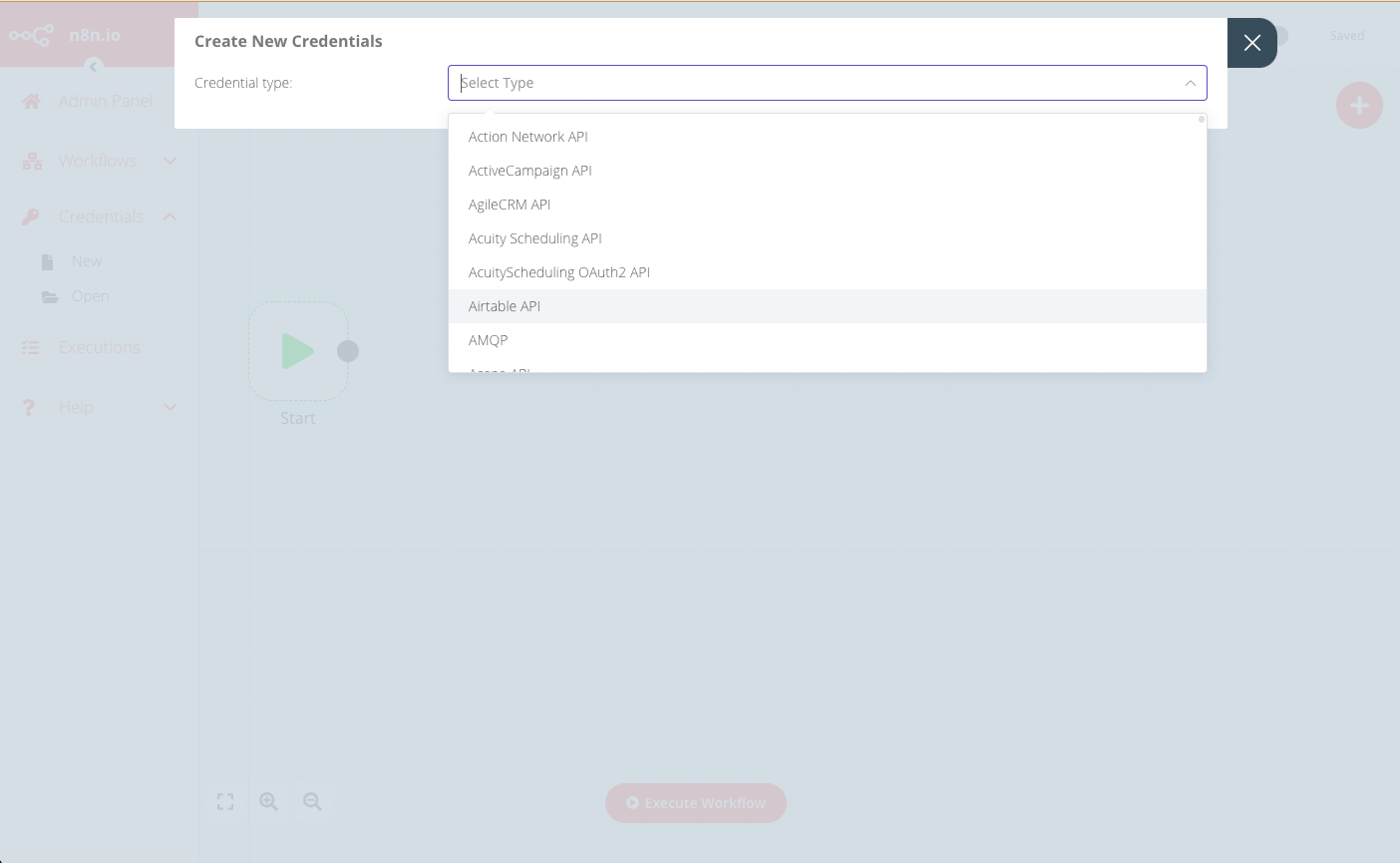
- 在 Create New Credentials 弹窗中输入用户对应的凭据详情,并选择可访问这些凭据的节点
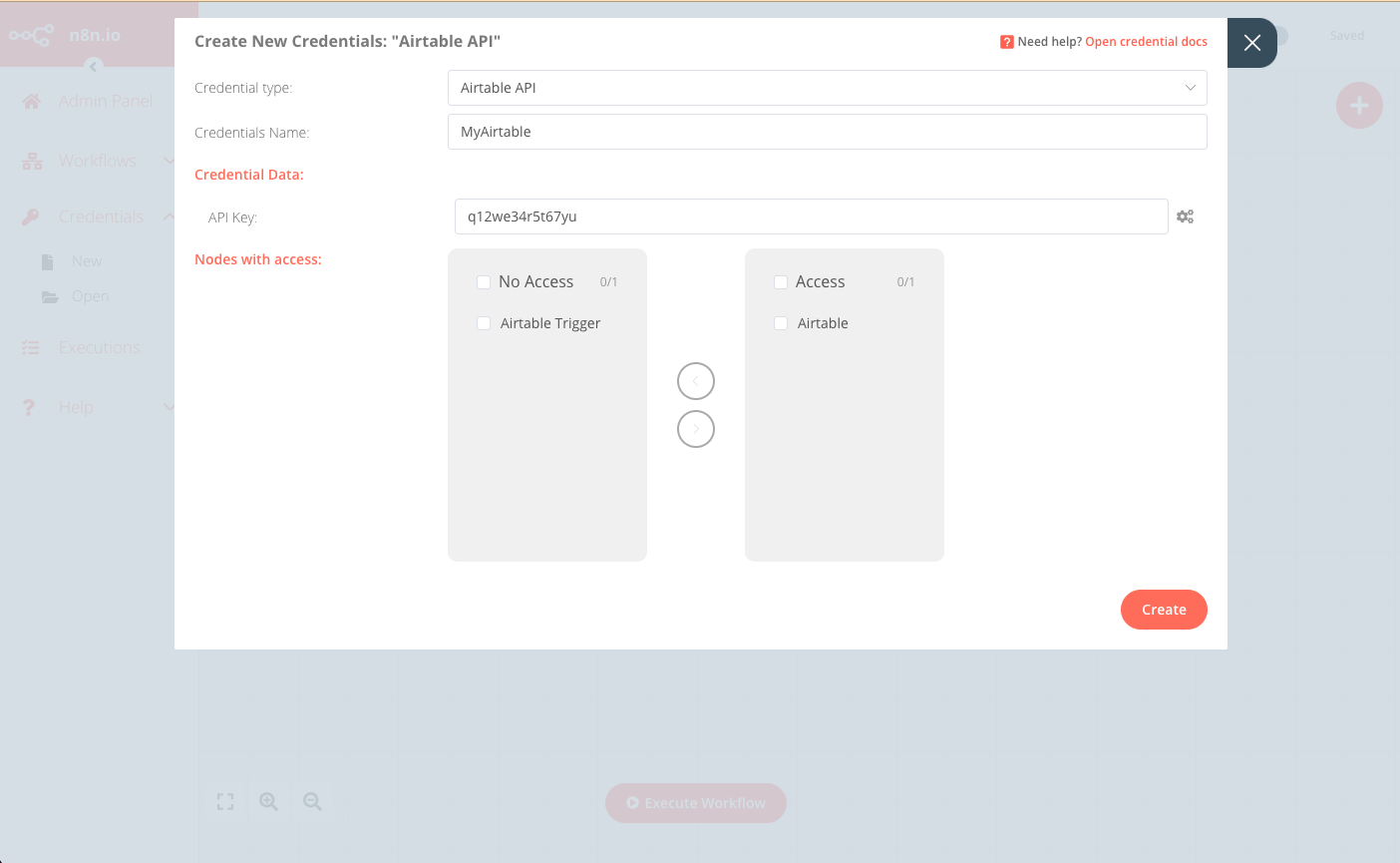
- 点击 Create 完成保存
使用 API#
通过调用编辑器界面使用的前端 API 也可实现相同效果,API 端点格式为:https://<n8n-domain>/rest/credentials
例如要创建前文编辑器示例中的凭据,请求示例如下:
POST https://<n8n-domain>/rest/credentials
请求正文如下:
{
   "name":"MyAirtable",
   "type":"airtableApi",
   "nodesAccess":[
      {
         "nodeType":"n8n-nodes-base.airtable"
      }
   ],
   "data":{
      "apiKey":"q12we34r5t67yu"
   }
}
响应中将包含新凭据的ID,在为此用户创建工作流时需使用该ID:
{
   "data":{
      "name":"MyAirtable",
      "type":"airtableApi",
      "data":{
         "apiKey":"q12we34r5t67yu"
      },
      "nodesAccess":[
         {
            "nodeType":"n8n-nodes-base.airtable",
            "date":"2021-09-10T07:41:27.770Z"
         }
      ],
      "id":"29",
      "createdAt":"2021-09-10T07:41:27.777Z",
      "updatedAt":"2021-09-10T07:41:27.777Z"
   }
}
3. 创建工作流#
最佳实践是创建一个"基础"工作流,随后为每位新用户复制该工作流,并根据其凭据(及其他详细信息)进行定制。
您可以通过编辑器界面或API调用来复制并定制模板工作流。
通过编辑器界面操作#
- 从菜单选择 工作流 > 打开,载入待复制的模板工作流
- 选择 工作流 > 复制,输入新工作流名称后点击 保存
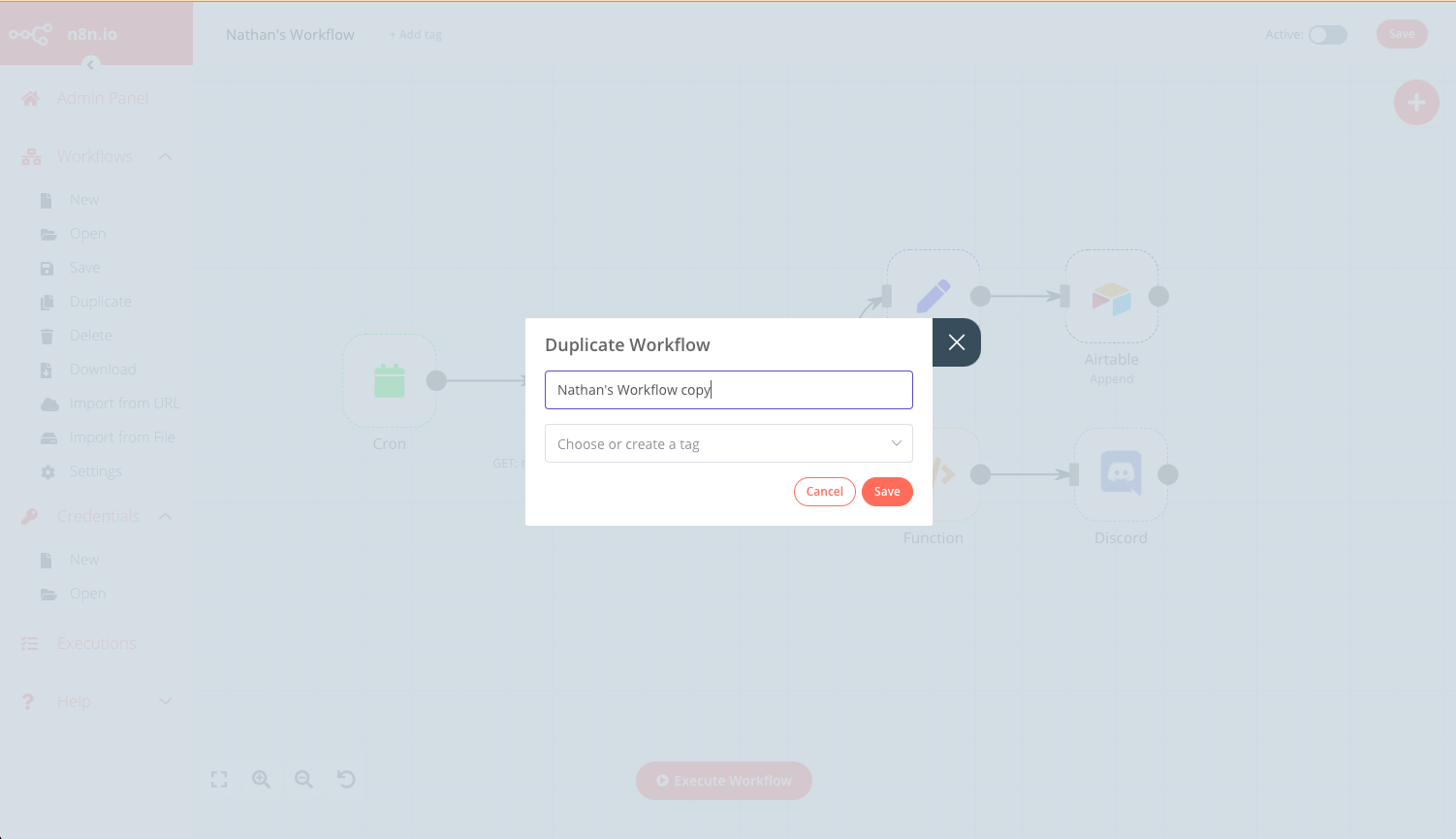
- 更新所有相关节点以应用当前用户的凭据(即前文创建的凭据)
- 点击 保存,并通过右上角开关将工作流状态设为 启用
通过API操作#
- 通过以下接口获取模板工作流的JSON数据:
https://<n8n-domain>/rest/workflows/<workflow_id>
GET https://<n8n-domain>/rest/workflows/1012
响应将包含所选工作流的JSON数据:
{
  "data": {
    "id": "1012",
    "name": "Nathan's Workflow",
    "active": false,
    "nodes": [
      {
        "parameters": {},
        "name": "Start",
        "type": "n8n-nodes-base.start",
        "typeVersion": 1,
        "position": [
          130,
          640
        ]
      },
      {
        "parameters": {
          "authentication": "headerAuth",
          "url": "https://internal.users.n8n.cloud/webhook/custom-erp",
          "options": {
            "splitIntoItems": true
          },
          "headerParametersUi": {
            "parameter": [
              {
                "name": "unique_id",
                "value": "recLhLYQbzNSFtHNq"
              }
            ]
          }
        },
        "name": "HTTP Request",
        "type": "n8n-nodes-base.httpRequest",
        "typeVersion": 1,
        "position": [
          430,
          300
        ],
        "credentials": {
          "httpHeaderAuth": "beginner_course"
        }
      },
      {
        "parameters": {
          "operation": "append",
          "application": "appKBGQfbm6NfW6bv",
          "table": "processingOrders",
          "options": {}
        },
        "name": "Airtable",
        "type": "n8n-nodes-base.airtable",
        "typeVersion": 1,
        "position": [
          990,
          210
        ],
        "credentials": {
          "airtableApi": "Airtable"
        }
      },
      {
        "parameters": {
          "conditions": {
            "string": [
              {
                "value1": "={{$json[\"orderStatus\"]}}",
                "value2": "processing"
              }
            ]
          }
        },
        "name": "IF",
        "type": "n8n-nodes-base.if",
        "typeVersion": 1,
        "position": [
          630,
          300
        ]
      },
      {
        "parameters": {
          "keepOnlySet": true,
          "values": {
            "number": [
              {
                "name": "=orderId",
                "value": "={{$json[\"orderID\"]}}"
              }
            ],
            "string": [
              {
                "name": "employeeName",
                "value": "={{$json[\"employeeName\"]}}"
              }
            ]
          },
          "options": {}
        },
        "name": "Set",
        "type": "n8n-nodes-base.set",
        "typeVersion": 1,
        "position": [
          800,
          210
        ]
      },
      {
        "parameters": {
          "functionCode": "let totalBooked = items.length;\nlet bookedSum = 0;\n\nfor(let i=0; i < items.length; i++) {\n  bookedSum = bookedSum + items[i].json.orderPrice;\n}\nreturn [{json:{totalBooked, bookedSum}}]\n"
        },
        "name": "Function",
        "type": "n8n-nodes-base.function",
        "typeVersion": 1,
        "position": [
          800,
          400
        ]
      },
      {
        "parameters": {
          "webhookUri": "https://discord.com/api/webhooks/865213348202151968/oD5_WPDQwtr22Vjd_82QP3-_4b_lGhAeM7RynQ8Js5DzyXrQEnj0zeAQIA6fki1JLtXE",
          "text": "=This week we have {{$json[\"totalBooked\"]}} booked orders with a total value of {{$json[\"bookedSum\"]}}. My Unique ID: {{$node[\"HTTP Request\"].parameter[\"headerParametersUi\"][\"parameter\"][0][\"value\"]}}"
        },
        "name": "Discord",
        "type": "n8n-nodes-base.discord",
        "typeVersion": 1,
        "position": [
          1000,
          400
        ]
      },
      {
        "parameters": {
          "triggerTimes": {
            "item": [
              {
                "mode": "everyWeek",
                "hour": 9
              }
            ]
          }
        },
        "name": "Cron",
        "type": "n8n-nodes-base.cron",
        "typeVersion": 1,
        "position": [
          220,
          300
        ]
      }
    ],
    "connections": {
      "HTTP Request": {
        "main": [
          [
            {
              "node": "IF",
              "type": "main",
              "index": 0
            }
          ]
        ]
      },
      "Start": {
        "main": [
          []
        ]
      },
      "IF": {
        "main": [
          [
            {
              "node": "Set",
              "type": "main",
              "index": 0
            }
          ],
          [
            {
              "node": "Function",
              "type": "main",
              "index": 0
            }
          ]
        ]
      },
      "Set": {
        "main": [
          [
            {
              "node": "Airtable",
              "type": "main",
              "index": 0
            }
          ]
        ]
      },
      "Function": {
        "main": [
          [
            {
              "node": "Discord",
              "type": "main",
              "index": 0
            }
          ]
        ]
      },
      "Cron": {
        "main": [
          [
            {
              "node": "HTTP Request",
              "type": "main",
              "index": 0
            }
          ]
        ]
      }
    },
    "createdAt": "2021-07-16T11:15:46.066Z",
    "updatedAt": "2021-07-16T12:05:44.045Z",
    "settings": {},
    "staticData": null,
    "tags": []
  }
}
- 保存返回的JSON数据,并更新新用户相关的凭据与字段。
- 使用更新后的JSON作为请求体,在端点
https://<n8n-domain>/rest/workflows处创建新工作流。
POST https://<n8n-domain>/rest/workflows/
响应中将包含新工作流的ID,您将在后续步骤中使用该ID。
- 最后,激活新工作流:
PATCH https://<n8n-domain>/rest/workflows/1012
在JSON负载中传递额外的active值:
// ... "active":true, "settings": {}, "staticData": null, "tags": []
单一工作流#
实施此方法需遵循四个步骤:
创建工作流#
此工作流的具体内容和范围会因实际用例存在较大差异,但需注意以下设计实现要点:
- 该工作流必须由Webhook节点触发
- 传入的webhook调用必须包含用户凭据及其他必需的工作流参数
- 需要使用用户凭据的每个节点都应采用表达式,使节点的凭据字段能读取webhook调用中提供的凭据
- 保存并激活工作流,确保为Webhook节点选择生产环境URL。更多信息请参阅webhook节点文档
调用工作流#
对于每个新用户或需要调用的现有用户,调用定义为工作流触发器的webhook并提供必要的凭据(及其他工作流参数)。